Identify handset stock
Maintain products, phone model details and supported device identifiers. Test the real identifiers used by your business, because their handling depends on the current product setup.

Phone shops sell both identifiable devices and fast-moving accessories. Staff need to know the difference between one handset and another, while owners need to track cables, cases, chargers, payments and supplier purchases without losing context.
The public demo contains fictional records. Actual features depend on business configuration and role permissions.
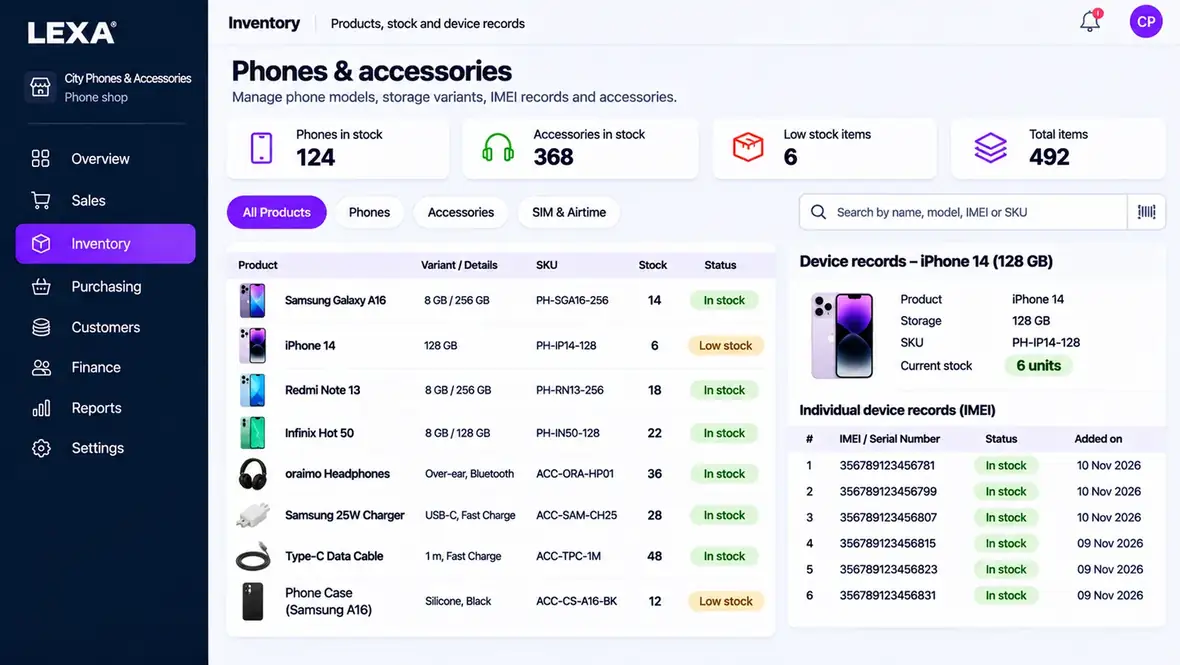
Phone shops sell both identifiable devices and fast-moving accessories. Staff need to know the difference between one handset and another, while owners need to track cables, cases, chargers, payments and supplier purchases without losing context.
An ERP-style system brings everyday operational records and financial documents into a connected workspace. For this category, LEXA lets you explore the business workflows below, then review the related money and accounting information. Availability depends on role access and configuration.
Maintain products, phone model details and supported device identifiers. Test the real identifiers used by your business, because their handling depends on the current product setup.
Use catalogue records, sales receipts, stock counts and supplier receiving for cases, screen protectors, earphones and chargers.
Where repair services are offered, review the available service case or work-order modules separately from a standard phone sale so a customer request is not mistaken for a purchase.
A phone retailer may want to compare cash received for devices with accessory sales, supplier costs and operating expenses. LEXA supplies sales, invoice, expense, payment and reporting areas; any automatic mobile-money settlement or IMEI-related fiscal tracking must be independently confirmed.
Explore LEXA's finance, invoicing and accounting modules, or learn what the wider LEXA ERP workspace includes.
These are prompts for testing the public demo and current LEXA modules, not evidence of a real customer installation.
Add a sample handset model and accompanying accessories.
Record one phone and an accessory and inspect the resulting receipt.
Check the relevant stock records, payment evidence and sales figures for the transaction.
LEXA includes product catalogues, item-related identifiers where configured, sales and inventory modules useful to a phone shop.
Yes. The browser demo is free and uses fictional business records.
This page does not claim automatic mobile-money reconciliation. Verify your payment processes and reporting needs before relying on a specific integration.